Hey Paperliker,
I love a clean slate as much as the next person. I also love not pretending I’m going to reinvent my entire personality by February.
So this month, I’m keeping it practical. A few smart upgrades. A little structure where it helps. Enough flexibility to make the whole “new year” thing feel useful instead of exhausting.
Ready to get started?

|
|
App-ventures in notetaking: What’s new and noteworthy
The new year is already bringing a steady stream of app updates, from small quality-of-life tweaks to bigger feature rollouts that change how you organize, study, and review your notes. Here’s what’s new across the notetaking world.
- Goodnotes added multi-level, collapsible outlines for both notes and PDFs, making long documents easier to navigate.
- Notability added the ability to customize your subjects with emojis and a new quiz type that lets you mix and match terms and definitions.
- Noteshelf now lets you filter notes with multiple tags at once. It also added audio transcription, a diary maker, and Sticky Notes.
- Evernote has announced that version 11 (a major update) is coming in early 2026. They also provided a recap of all the 2025 improvements.
- MyScript Notes (formerly Nebo) added multilingual text recognition, which is great for language learning or those who write in multiple languages.
- MarginNote 4 now features an AI breakdown that provides a full book (or chapter) summary for your notes.
- CollaNote got a new AI Pen that lets you squeeze the Apple Pencil (Pro only) and circle an area to activate AI. It can turn drawings into stickers, convert handwriting to text, or create an AI chat based on the content.
With this many updates landing early in the year, it’s a good time to revisit the apps you already use and see what’s quietly gotten better.
|
|
Make your resolutions stick. (Image: Tim Mossholder on Unsplash)
This month: Make it your best year yet
January usually brings a flood of advice and goal-setting energy. Some of it’s helpful; some of it is a lot. To keep things manageable, we grouped a few solid resources by the kind of reset you’re in the mood for right now.
If you’re focused on big goals, but want them to last:
If you’re more in a mindset-reset phase:
If you’re thinking bigger-picture health:
No need to tackle all of this at once. Pick one lane. Start there. The rest will still be here when you’re ready.
|
|
Image: wealthwells
Lindsay’s productivity challenge: SMART Goals
January is full of big intentions. The problem usually isn’t motivation. It’s vagueness. That’s where SMART goals come in.
What are SMART goals?
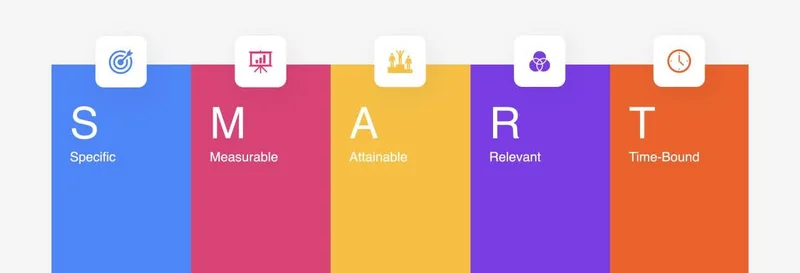
SMART goals turn fuzzy resolutions into something you can actually work with. Each goal should be:
- Specific – Clear enough that you know exactly what you’re doing.
- Measurable – You can tell when you’ve made progress.
- Achievable – Realistic for your current time and energy.
- Relevant – Connected to something that actually matters to you.
- Time-bound – Anchored to a deadline, not “someday.”
For a more in-depth look, you can check out my full experience trying out this method last year.
How I’m using it this month
I started with a resolution I already had: Make real progress on editing my novel.
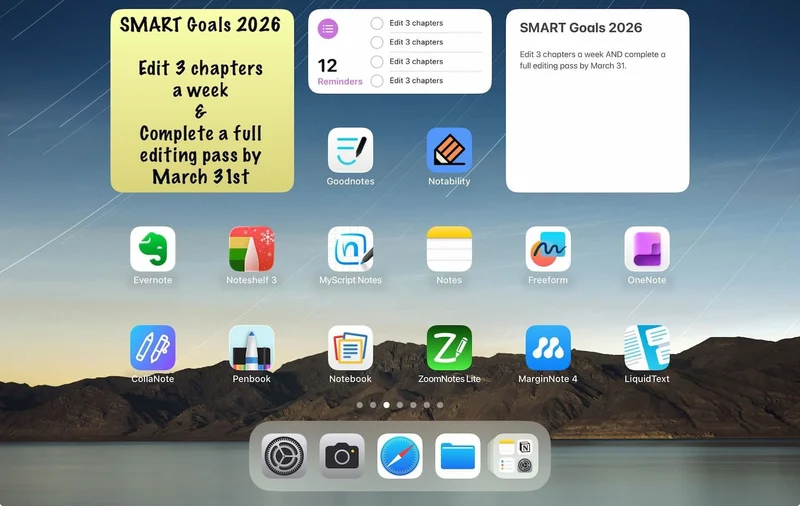
That’s vague enough to feel motivating and useless at the same time, so I rewrote it as a SMART goal: Edit 3 chapters per week and complete a full editing pass of my current novel draft by March 31, 2026.
Once it was specific, I made it visible. I added the goal to my iPad home screen as a small widget so it’s the first thing I see when I open my iPad. No checklist, no streaks. Just a clear reminder of what I’m focusing on during this phase of work.
Having it spelled out that way has made it easier to sit down and start, even on days when I’m short on time or energy.
Here’s a look at my widgets.
|
|
Widgets are a great way to see what you need to do. (Image: Screenshot by Lindsay Armstrong / Paperlike)
Your challenge
Now it’s your turn.
Take one New Year’s resolution you already have and rewrite it as a SMART goal with a clear outcome and deadline.
Then add it somewhere you’ll actually see it, like a widget or note on your iPad home screen.
You don’t need a special app or a complicated setup. The goal is visibility, not tracking. You can do this in various ways. The easiest is probably to create a QuickNote in Apple Notes and add that widget to your screen. If you want to set due dates, you can use the Reminders app.
Another option is to download a sticky note app, such as Sticky Widgets, which lets you create a sticky note and pin it to a widget on your home screen.
But whichever way you do it, remember: It’s one goal. One visible reminder. That’s the whole challenge.
Want to join in?
Share your SMART Resolution and tag @paperlike with #PLChallenge on Instagram.
Post on Stories or Feed by February 4, and you could be one of three winners to receive a set of our Pencil Tips.
No perfection required. Just something specific enough to start.
Must be a legal resident of the US or UK and 18+ to enter. No purchase necessary. Ends February 4, 2026. See full terms & conditions.
|
|
Image: Paperlike
Plan your year right
If you’re setting up your goals, routines, or projects for the year ahead, this is a good moment to get your planning system in place.
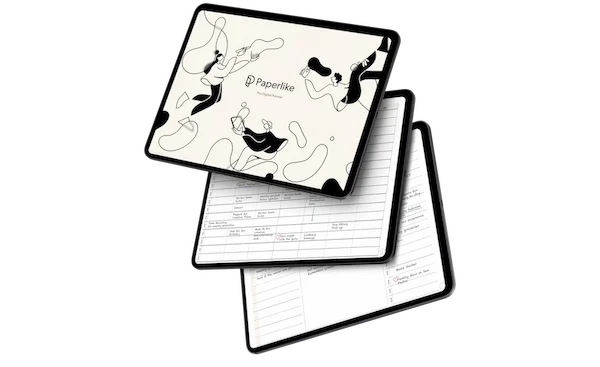
For a limited time, every order on our website comes with a free Pro Planner ($12.99 value), automatically added to your cart at checkout. No codes, no extra steps. Just a solid planning tool to help you map out the year in a way that actually works for you.
The offer runs through January 31, so if you’ve been meaning to refresh your setup, now’s a good time to do it.
|
|
Wrap up
That’s it for this month.
If you’re easing into the year, that’s fine. If you’re all-in already, also fine. There’s no single right pace for January, and there’s plenty of time to adjust as you go.
And because not everything needs to be productive, we’re ending with something purely for fun: The Out-of-Touch Adults' Guide to Kid Culture: The Memes of 2025. If you’re like me, you hear your kids reference these constantly and nod along while having no idea what half of them actually mean. If you already knew them all, I guess you’re cooler than me. 😜
See you next month!
Lindsay
Productivity & Notetaking Writer |
|
|
|
|