|
|
| |
|
|
| |
| |
If you’ve ever mastered a song, you know the sinking feeling when you realize the vocal was mixed too low, or got buried in a live recording. Sure, you can try EQ, but that’s going to affect other sounds as well. And if the vocal is already embedded in the song, there’s nothing you can do—right?
|
|
|
| |
| |
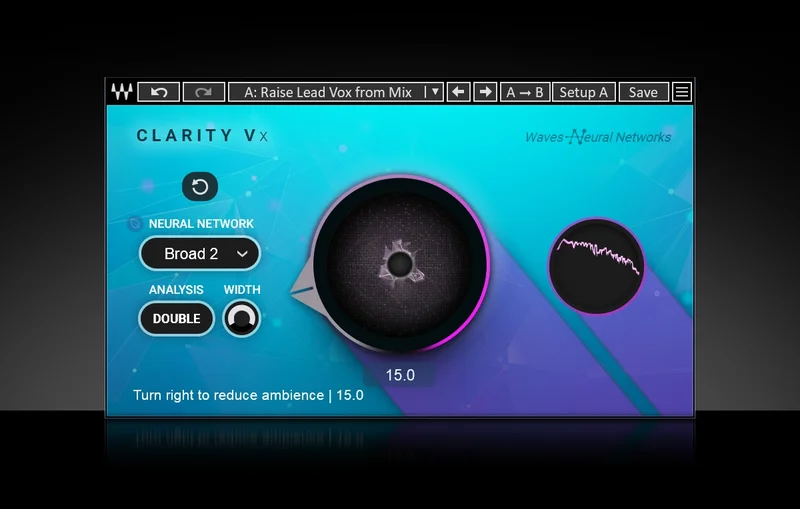
Amazingly, you often can fix that vocal, because of a hidden talent in Clarity Vx. It’s already become the go-to processor for removing background noise from vocals, narration, field recordings, and more. But the controls are flexible enough that you can use Clarity Vx to lift the vocals (especially lead vocal) up from mixed tracks.
|
|
|
| |
| |
The process works not by making the vocal louder, but by making the rest of the mix softer. For best results (this is important), choose the Broad 2 neutral network setting, and Double for the Analysis setting.
|
|
|
|
|
| |
Once those are set, turn up the main Ambience adjust control until the voice is at the right level. In most cases, setting the control between 10 and 15 (or less) does the job. However, for really problematic mixes, you can often go even higher without compromising the rest of the mix.
|
|
|
| |
| |
This may sound too good to be true, but really, it’s just an unusual application of technology that has already proven itself. You’re just telling Clarity Vx to treat everything that’s not the vocal as noise that should be reduced…so it does. Amazing.
|
|
|
| |
| |
This tip courtesy of Craig Anderton.
|
|
|
| |
|