|
|
|
|
| |
|
|
| |
| |
Ever find a great drum loop, but there was too much kick? Or not enough? Or the snare needed more punch?
|
|
|
| |
| |
Standard EQ affects sounds with no break. But with the F6 dynamic EQ, boosting or cutting happens only if the audio goes above or below a certain threshold. For example, you can reduce an overly loud hi-hat’s level only when it hits. Otherwise, the high frequencies aren’t affected.
|
|
|
| |
| |
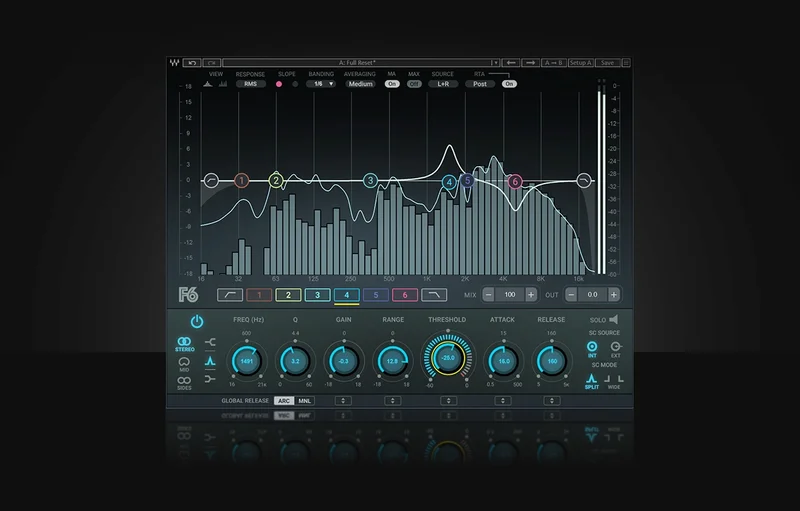
For example, this screenshot shows how to make the snare in our drum loop to punch more:
|
|
|
|
|
| |
| 1. |
Choose one of the 6 bands in F6 for processing the snare. |
| |
| 2. |
Turn up Gain to boost the audio. |
| |
| 3. |
“Tune” the filter to the snare frequency you want to emphasize, by varying Freq and Q. |
|
|
|
| |
| |
After locating the frequency, control it with dynamics.
|
|
|
| |
| |
| 1. |
Return Gain to 0.0 (unless you also want a boost or cut that’s independent of dynamics) |
| |
| 2. |
Set the maximum amount of boost with the Range control. |
| |
| 3. |
Tweak the Threshold so that peaks exceed the Threshold. Higher peaks above the Threshold apply more boost. |
|
|
|
| |
| |
In the screenshot, the snare’s Range is +12.8 db. The Threshold’s outer ring shows the level at the band’s frequency. The inner dial sets the Threshold. Because the peak exceeds the threshold, you can see the boost being applied. Also, stage 6 is applying a cut to the hi-hat. Stage 2 is boosting the kick but there’s no visible boost, because the kick didn’t hit when the screenshot was captured.
|
|
|
| |
| |
So, the next time your drum loop needs a remix or a rebalancing, don’t give up on it! Just insert the F6.
|
|
|
| |