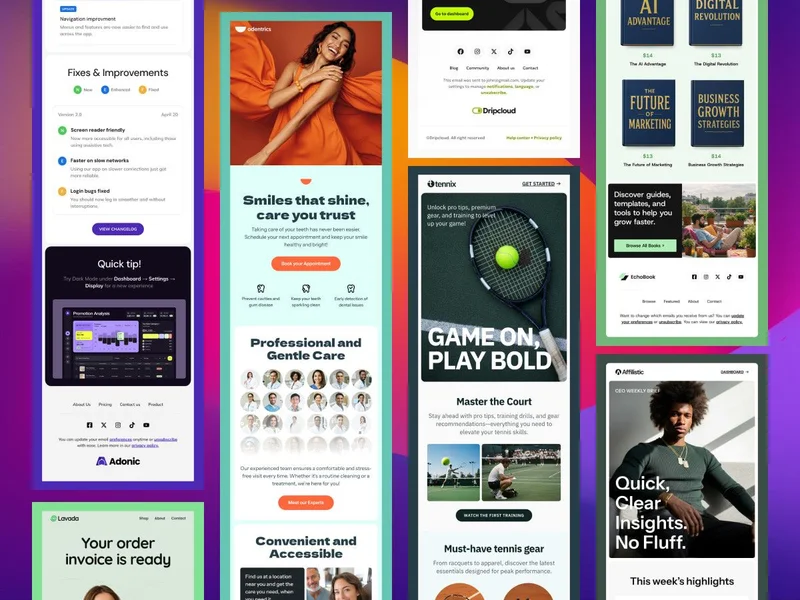
New Email Templates, Postcards & Slides Updates | | | | | Our collection of email templates just got a major upgrade! We’ve rolled out a brand-new set of designs crafted to accelerate your campaigns and spark fresh ideas. This round, you’ll find industry-focused layouts built especially for e-commerce, invoicing, dental services, sports e-books, lawyers and CEOs. Plus, thanks to your feedback, we’ve already kicked off development on even more niche templates, keep an eye out as they arrive in the coming weeks! We’ve also released some important product updates! Postcards (our email builder) has a few new improvements, and Slides (our website builder) now supports a brand-new form integration. Postcards Email Builder We’re thrilled to announce that an important update to the image and gallery functionality in Postcards email builder is coming soon! The new image gallery will allow you to organize your assets more efficiently and even edit images directly within the editor. You’ll also be able to clean up your image library by identifying and removing unused files from your account. Additionally, the update will help you spot unoptimized images and those that are too large for modern email campaign standards, ensuring better performance and faster load times. Last month, we worked hard to improve the stability and performance of Postcards. Here’s a roundup of the latest fixes that went live this month: Editor & Export Fixes - Resolved missing background images in exports without image hosting.
- Fixed text wrapping issues in grid layouts during export.
- Corrected border radius import issues when using the Figma plugin.
- Addressed text alignment problems when selecting text items.
- Fixed layout bug causing Grid elements to appear misaligned during export.
Outlook-Specific Fixes - Removed unnecessary padding and corrected height/margin calculations for images, cells, and text.
- Fixed small line-height rendering issues and width settings for Grid elements in Outlook.
- Improved rendering and layout precision for Outlook email previews.
General Improvements - Fixed white screen issue for newly registered users editing presets.
- Prevented bugs affecting default button icons and current preset selections.
- Resolved image gallery upload issues and added ability to better manage unused images.
- Fixed bugs in copying email code and rendering empty text blocks.
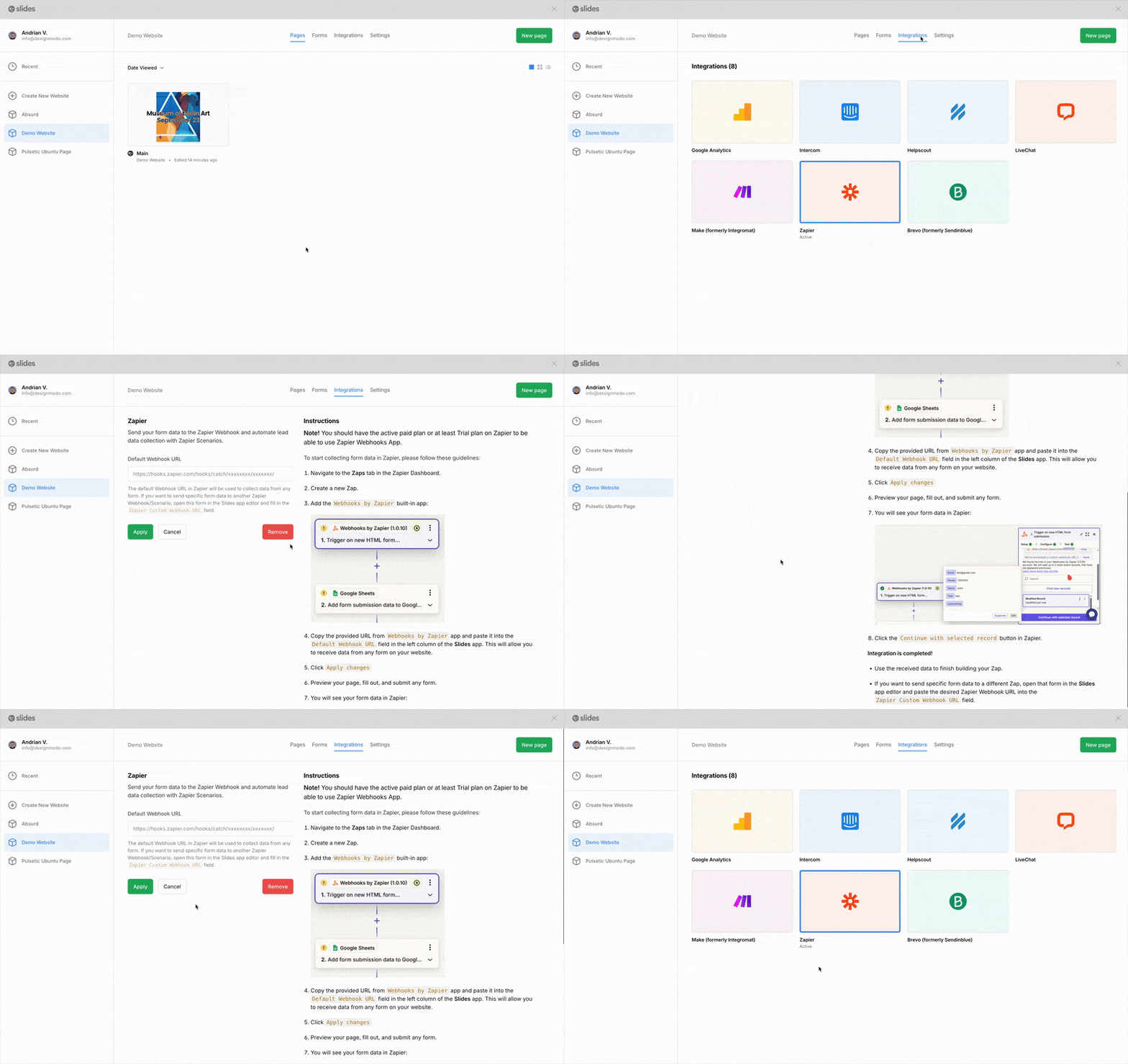
These fixes ensure more consistent rendering across platforms and a smoother experience when building or exporting email templates. | | | | | | | Slides Website Builder We’re thrilled to announce that Slides now integrate with Zapier, giving you the power to connect form submissions to over 7,000+ popular apps and services - all without writing a single line of code. Now, every time someone submits a form on your Slides website, you can instantly: - Add a row to Google Sheets
- Send a notification to Slack or Microsoft Teams
- Create a new contact in Mailchimp, HubSpot, or your favorite CRM
- Send an automated email through Gmail or Outlook
- Trigger workflows in Notion, Trello, Asana, and many more!
Why You’ll Love It: - No code required – set up in minutes using Zapier’s visual interface
- Automate repetitive tasks and save valuable time
- Create powerful workflows by chaining actions across different tools
- Stay organized by centralizing your form responses wherever you need them
This update unlocks a whole new level of productivity and flexibility for your Slides projects - especially for lead generation, feedback collection, surveys, and more. Background Image Settings We resolved an issue where background images were being automatically resized (e.g., forced into “cover,” “contain,” or “fit” modes). You can now maintain the image’s original size and take full advantage of background-repeat settings - perfect for patterns, textures, or custom design elements that need pixel-perfect placement. Slider Navigation A bug affecting slider navigation using the data-slider-action="0" attribute has been fixed. This was particularly noticeable on Slide 75, where the navigation triggers didn’t respond properly. Sliders now behave as expected across all navigation scenarios. | | | | | | Must-Read Articles We’ve also put together a collection of insightful articles to keep you inspired and informed this May: Discover the multifaceted role of an email designer, from strategizing campaigns to crafting visually engaging layouts that drive user interaction. This article delves into the essential skills and responsibilities that make email designers pivotal in digital marketing. Whether you’re a beginner or looking to refine your skills, this curated list of Figma tutorials offers step-by-step guidance to help you master UI/UX design. Learn from industry experts and elevate your design projects with these comprehensive resources. First impressions matter. Enhance your email communication with this collection of compelling opening lines designed to capture attention and increase engagement. Ideal for marketers, sales professionals, and anyone looking to improve their outreach. Responding to appreciation emails can strengthen professional relationships. This guide provides practical tips and templates to help you craft thoughtful replies that convey gratitude and reinforce positive connections. Looking Ahead We’re continuously improving our apps, and exciting new updates and features are on the way! We’ll keep you informed with monthly email updates. If you have any suggestions, just reply to this email - we’d love to hear from you! – The Designmodo Team | | | | | | | | | | Please reply directly to this email - we would love to hear your thoughts! All the best! 👋 | | | | | | | | | | This email was created using the Postcards email builder. You received this email because you are a Designmodo member. 50 N 1st St, Brooklyn, NY 11249, United States Copyright © 2025 Designmodo Inc., All rights reserved. | | | | | | |