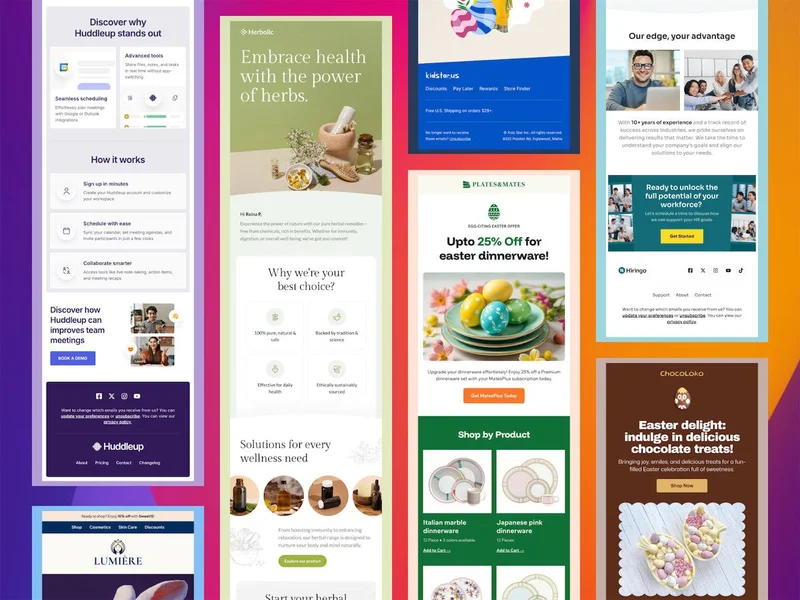
New Email Templates, Postcards & Slides Updates | | | | | Spring is here, and we’re excited to share the latest updates from Designmodo! A major focus this month has been preparing for our server upgrades and improvements. In March, we plan to upgrade our servers to newer, more powerful hardware, enhancing performance. This upgrade may result in brief downtime, which will be announced on our status page. Postcards Email Builder This month, we’ve fixed and improved the text editor, making it more stable. The most important update focused on copying and pasting text from external sources. Previously, this caused issues and inconsistencies for some users, but we’ve now addressed these problems to ensure a smoother experience. Below, we’ve detailed the improvements we made in February for Postcards: New Features & Additions - 11 New Email Templates! Including fresh designs for Easter-themed emails. Check out our email template collection to find the best one for your business.
- Single-click to open a project: Now, a single click on a project thumbnail or name opens the project (instead of double-click).
- Shift + Click allows selecting multiple projects.
- Click & Hold enables dragging projects into another folder.
- Optimized exported template code: Reduced the HTML template weight for better performance.
- Improved export error handling to Brevo: Now displays a clearer message: “This keyword is not allowed here.”
Text & Typography Improvements - Project display issues in mobile mode: Fixed paragraph indentation and list numbering inconsistencies when exporting.
- Fixed issue where text style was not preserved on copy/paste and did not respond to style changes.
- Pasted text is now properly reformatted when spanning multiple lines.
- Resolved issue preventing fonts from applying correctly to a text element after setting a global font.
- Fixed bug when switching from % to px in the line-height controller on multiselected text elements.
- Text elements now display correctly in older projects.
- Resolved issue where text was not displayed correctly in list format when selected for editing.
- Fixed incorrect letter spacing in the editor.
- Addressed issue where the font display changed unexpectedly when selecting text for editing.
- Fixed issue where changing parameters for part of the text didn’t work if an empty line was selected.
- Fixed issue where a custom font was replaced with an alternative when copying.
- Resolved issue with exporting a project containing custom fonts to Klaviyo.
- Fixed issue with old projects due to “entity code” in the font family.
- Adjusted text spacing inside buttons to ensure consistency between Gmail and the editor.
- Added a fallback font for the font family to improve rendering in the mobile version.
- Improved text rendering when selecting a text item for editing.
- Fixed issue where styles were not correctly applied to parts of the text (e.g., lists) containing links.
- Resolved issue where the Fira Sans font was not displaying correctly when applying list formatting to text.
- Fixed issue where values in text controllers were not saving correctly after pasting text from Google Docs.
- Fixed issue where text would disappear after using the ‘Clear formatting’ button.
- Fixed issue with text highlighting when containing references.
Bug Fixes & Stability Improvements Undo/Redo Fixes: - Error occurring when using Undo after inserting an invalid image link.
- Undo cancellation not working correctly for element movement in Grid.
- Missing events in the change history, preventing Undo/Redo functionality.
- Undo/Redo not applying changes if the modification was in a hidden element.
Grid & Layout Fixes: - Alignment issues for parent and child elements inside a Grid.
- Table borders extending beyond their intended limits.
- Cell size setting issue when adjusting table width in the central part of the editor.

| | | | | | Slides Website Builder We’re excited to bring you a new set of updates and fixes designed to improve your experience with Slides website builder! This update includes a seamless Brevo integration, performance optimizations, and UI improvements. We’ve also addressed several bugs to ensure a smoother workflow. New Features & Additions - Brevo Integration Added: Now you can seamlessly integrate Brevo into your workflow.
- Improved Layout in the ‘Add’ Tab: Optimized the loading speed of the editor by preventing unnecessary images, YouTube, and Vimeo videos from loading as default elements, even when not added.
- Added Link to the Published Page Version: You can now easily access the published version of your page.
Bug Fixes & Stability Improvements - Missing Info in the Forms Section: When a site is published but has no Form Entries, the projects pop-up now properly displays a notification.
- Fixed Styles in “Colors” Dropdown (Dark Mode): UI improvements in dark mode.
- Fixed Page Creation with Duplicate Filenames: Users can no longer create multiple pages with the same filename.
- Fixed Custom SCSS Variable Generation: Custom color creation and modification now work correctly.
- 403 Error When Adding Examples: Resolved an issue where adding any example resulted in a 403 error.
- Fixed Project Deletion Issue: Deleting a project now correctly removes the selected project, not just the last visited one.
| | | | | | Must-Read Articles We’ve also put together a collection of insightful articles to keep you inspired and informed this March: Looking Ahead We’re continuously improving our apps, and exciting new updates and features are on the way! We’ll keep you informed with monthly email updates. If you have any suggestions, just reply to this email - we’d love to hear from you! – The Designmodo Team | | | | | | | | Please reply directly to this email - we would love to hear your thoughts! All the best! 👋 | | | | | | | | | | This email was created using the Postcards email builder. You received this email because you are a Designmodo member. 50 N 1st St, Brooklyn, NY 11249, United States Copyright © 2025 Designmodo Inc., All rights reserved. | | | | | | |