New in Postcards and Slides: AI Design Analyzer, New Email Templates, Easier Editing |
|
|
|
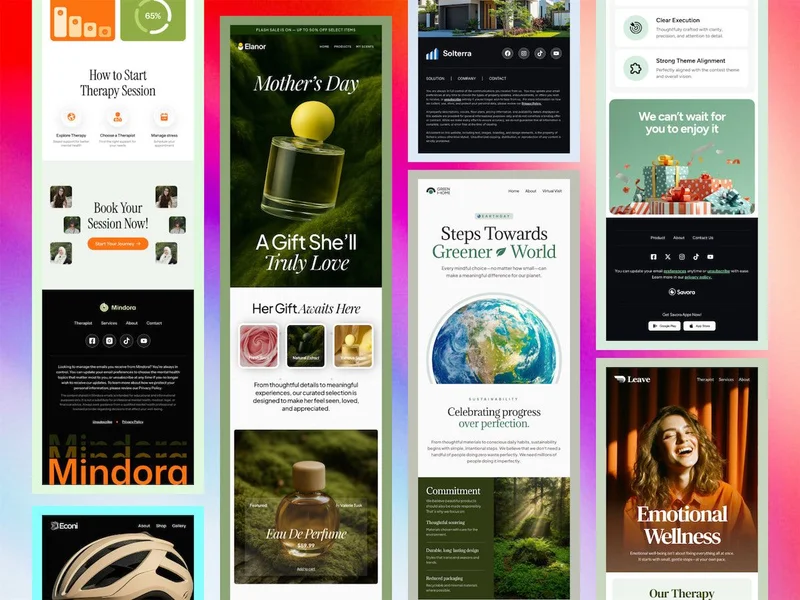
Hello, In Postcards, we added an AI-powered email design analyzer to the Health Bar, so you can scan your email, get a detailed review, and receive clear recommendations for improvement. We also published new email templates to help you launch campaigns faster, improved AI project analysis for more accurate suggestions, and shipped stability fixes, including improvements to the Figma email plugin and export behavior. In Slides, this update is all about easier editing and improvements to spacing controls, element selection inside controllers, carousel behavior, and several fixes that smooth out the editor workflow. Below is a summary of what’s new. Postcards Email Builder New - AI-powered email design analyzer added to the Health Bar, you can now scan your email using built-in AI and get a detailed review of the design, plus clear recommendations for improvement.
- 10 new email templates added, expanding the template library with more fresh starting points.
Updated - AI-powered project analysis improved, delivering more accurate recommendations across your projects.
Fixed - Stability improvements, fixed several issues that could cause application crashes.
- Figma export font replacement issue resolved, fixed a problem affecting font replacement when exporting projects from Figma.
- Minor bug fixes in the Figma plugin, improving overall reliability.
|
|
|
Slides Website Builder In Slides, this update focuses on easier editing, better selection behavior in complex layouts, and smoother carousel workflows, plus a set of fixes that remove common editing interruptions. Updated - Slides revision for easier editing, SVG logos were replaced with standard images across navigation panels and several slides, making logo replacement simpler. Logos also now show and hide correctly in whiteSlide mode.
- Improved Spacings controls, margins now support “auto”, empty values reset cleanly, and negative values are supported via keyboard and drag. Similar support was added to Position, Letter Spacings, Grid gutter, and related settings.
- Better element selection, elements inside slider controllers can now be selected and edited. Images inside videoThumbnail elements are now clickable and editable.
- Swiper carousel improvements, duplicating slides or controller elements no longer leaves both items marked as selected, and the carousel refreshes properly after changes.
- Improved thumbnail selection in controllers, thumbnail images in slider controllers can now be selected and edited directly.
Fixed - Link and button clicks no longer jump to the first slide, keeping your editing flow uninterrupted.
- Category tag background color fix, category tag elements can now be styled correctly (previously blocked in Slide 170).
- Text editor Enter behavior fixed, Enter now creates a single new line instead of extra spacing.
- whiteSlide background image fix, background images now work correctly with whiteSlide enabled, and hidden states update properly when changing backgrounds.
|
|
|
Must-Read Articles We’ve also put together a collection of insightful articles and resources to keep you inspired and informed this March: A clear comparison of five popular Substack alternatives, what each platform is best at, and how to choose based on your growth and monetization goals. A practical guide for law firms on building effective email campaigns, from list building and segmentation to automation, compliance, and ready-to-use email ideas. Inspiration and ready-to-use template ideas for Women’s Day sends, including messaging angles and layout tips that feel thoughtful and on brand. A quick, practical walkthrough of mailto links, including how to prefill subject lines and message text, plus common mistakes to avoid. Looking Ahead We’re continuing to invest in making Postcards and Slides faster, more flexible, and easier to use day to day. Next up are improvements to the design building experience, more professionally designed templates, new modules, and expanded team functionality to make collaboration smoother and more consistent across projects. We’re also working on richer preview settings, cleaner workflows for checking layouts before publishing, and more optimized code output, so your pages and emails render predictably and ship with less effort. As always, thank you for building with Designmodo. — Warm wishes, the Designmodo team. |
|
|
| | Please reply directly to this email — we would love to hear your thoughts! All the best! 👋 |
|
| |
|
|
|
|
This email was created using the Postcards email builder. You received this email because you are a Designmodo member. 169 Madison Ave, #79627 New York, NY 10016, United States Copyright © 2026 Designmodo Inc., All rights reserved. |
|
|
|
|
|