Hey Paperliker,
November is the pregame for holiday chaos. The calm before the cart storm. The month when “getting things done” takes on two meanings: checking off tasks and checking out deals.
Before Black Friday hits, let’s talk apps, deals, gift guides, and one productivity method that might actually keep you sane.
Let the shopping (and productivity) begin.

|
|
App-ventures in notetaking: What’s new and noteworthy
The notetaking world is wrapping up the year with a big one.
CollaNote 4.0 just dropped, and it’s packed with upgrades that make the app more powerful, polished, and easy to use. The new Glass Design gives everything a clean, modern feel, and the interface feels faster and more focused.
There’s also a brand-new Audio Tool with AI transcripts that records your notes, lectures, or meetings right inside the app. The AI generates accurate transcripts automatically and syncs them with your handwriting for seamless playback and review.
Other highlights include a smarter Translation Tool that’s more natural and context-aware, an expanded Flashcard Library for study sessions, and a growing Digital Planner Library filled with stylish, ready-to-use templates. You can also import more file types than before and enjoy fresh papers, templates, and sticker packs across the board.
A few other quick hits: Goodnotes added a Draw Shape option to help you create clean, precise lines, and MarginNote 4 expanded its AI to handle more learning tasks with automatic outlines, OCR, and smarter flashcard tools.
It’s a good month to update your apps and see what’s new before the busy season hits.
|
|
Check out Paperliker’s Gift Guide for shopping ideas. (Image: Paperlike)
This month: Shop ‘til you drop
Once you’ve got your review skills locked in, it’s time for the fun part. We’ve rounded up the best gifts for digital creators and doers in our brand-new Paperliker’s Gift Guide. |
|
Want even more ideas? Here are a few lists we’re loving right now:
Happy hunting, and may your wishlists be long and your deals be sweet.
|
|
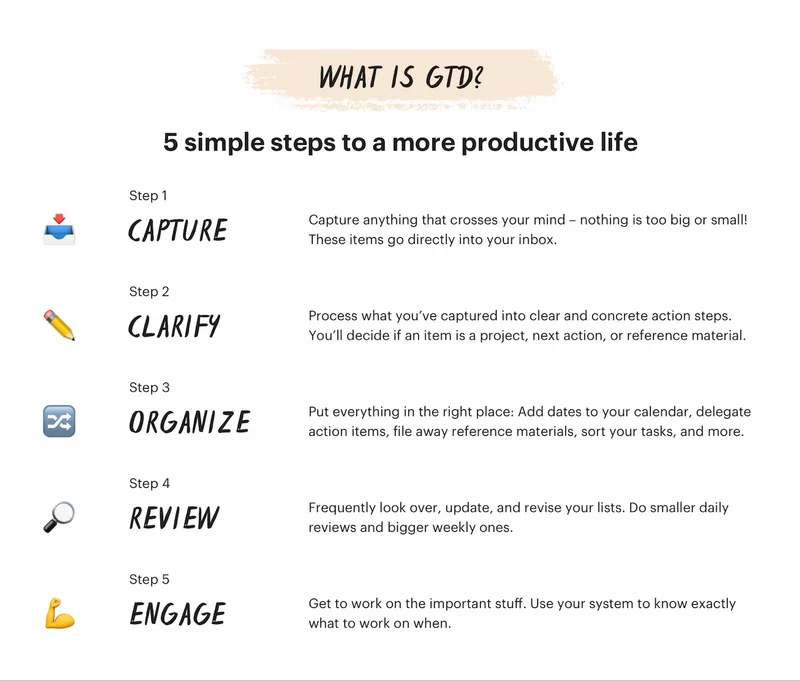
Getting Things Done is a popular productivity method. (Image: Todoist)
Lindsay’s productivity spotlight: Getting Things Done (GTD)
Last year, I tested out every productivity method I could find, from Eat That Frog to Kanban. But somehow, I skipped one of the biggest names in the game: Getting Things Done (GTD). With the holidays creeping closer and my to-do list multiplying by the minute, this felt like the right time to give it a real test run.
Here’s what happened when I did.
About Getting Things Done
David Allen developed this productivity method, and it has been a go-to system for decades. It’s designed to help you capture every task, idea, and commitment in one place so that your brain doesn’t have to hold onto it all.
The concept: Collect every open task or thought in a trusted system. Clarify what each one means and decide what needs to happen next. Organize everything into lists or categories. Review regularly to keep things current. Then, take action on what’s most important.
The goal: To reduce mental clutter and make progress on the right things with less stress and more focus.
|
|
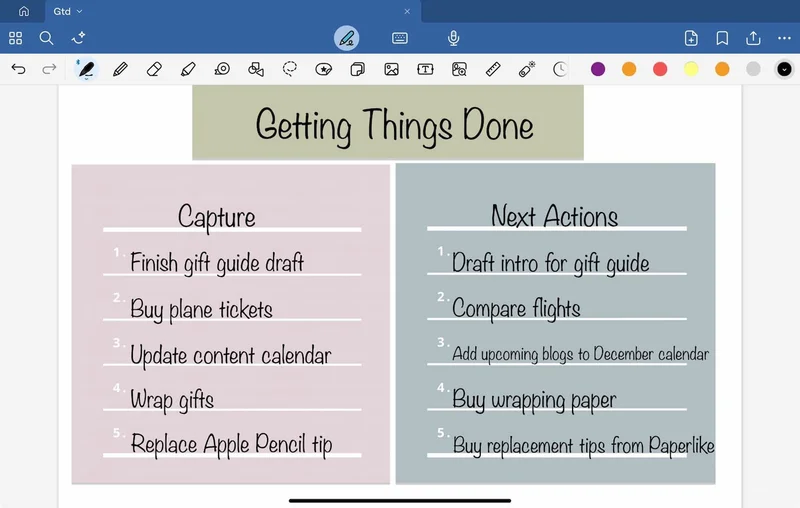
The first two parts of GTD are capture and clarity/next actions. (Image: Goodnotes / Screenshot by Lindsay Armstrong / Paperlike)
From capture to clarity
When I tried GTD this month, I wanted to see if it could help me stay grounded during the pre-holiday rush. Between project deadlines, campaign planning, and early shopping prep, my brain felt like an overstuffed inbox.
What was I aiming for? To empty my head, organize the chaos, and stop worrying about what I might be forgetting.
I began with the first step, Capture. I wrote down everything that was taking up mental space: finishing the next blog draft, updating the Paperlike Gift Guide, buying plane tickets, wrapping up edits, and even small things like replacing my Apple Pencil tip. No sorting. No organizing. Just one long list in Goodnotes.
Next came Clarify. For each item, I asked, “What’s the next action?” A vague note like 'holiday prep' turned into specific tasks: buy wrapping paper, check delivery times, finalize the shopping list. Once each task had a clear next step, the list already felt lighter.
Then it was time to Organize. I split everything into categories: Work, Home, Personal, and Errands. Work went into my project planner in Goodnotes, while the rest lived in a simple checklist I could reference on the go.
For Reflect, I set aside ten minutes at the end of each day to review what I had finished and move anything incomplete to the next day. This kept the system current and prevented things from falling through the cracks.
Finally, Engage. Each morning, I opened my lists and picked the next action from the right category. If I was at my desk, I focused on Work. If I was running errands, I opened my Personal list. It was simple and surprisingly flexible.
By the end of the month, my workload felt easier to manage. My brain wasn’t trying to store every detail, and my lists kept me moving in the right direction. The hardest part was keeping the capture habit consistent. Once I did, everything else clicked.
If you’re heading into a busy season with too many tasks to track, GTD might be the structure you need. It helps you see everything at once, so you can act with purpose rather than panic.
Simple, practical, and genuinely effective. GTD turns overwhelm into order, one clear step at a time.
|
|
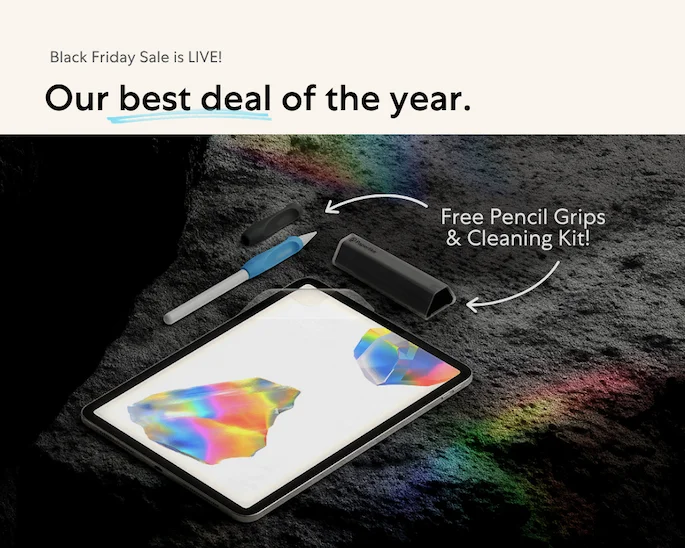
Image: Paperlike
Black Friday/Cyber Monday starts now
No waiting, no last-minute rush, and no surprise discounts later. What you see now is what you’ll get on Black Friday and Cyber Monday.
Here’s the deal:
- Spend $50 and get a set of free Paperlike™ Pencil Grips.
- Spend $100 and get both the Pencil Grips and a Paperlike™ Cleaning Kit free with your order.
Everything’s live right now on our website, so you can get a head start on your holiday shopping.
Simple, easy, and stress-free. Just the way we like it.
|
|
Wrap up
That’s it for this month’s roundup. November is busy enough without adding last-minute chaos, so here’s your reminder to plan ahead, stay organized, and maybe treat yourself to a few upgrades while you’re at it.
We’ll be taking a short break in December, but we’ll be back in the new year with more app updates, productivity experiments, and tools to help you make the most of your iPad.
Until then, stay focused, check things off, and call it a year well done.
Cheers!
Lindsay
Productivity & Notetaking Writer |
|
|
|
|