Hey Paperliker,
Creativity isn’t just for artists and designers. It’s a secret weapon for solving problems, hitting goals, and breaking through plateaus.
This month, we’re exploring unexpected ways to spark fresh ideas and get things done.
Check it out.
|
|
App-ventures in notetaking: What’s new and noteworthy
Need a reason to open your favorite notetaking app? This month’s updates bring smarter features, faster actions, and even a little mindfulness. Here’s what’s new:
- 🧠 Evernote
Say hello to AI-powered transcriptions. Whether you're recording lectures, meetings, or just brain-dumping your next big idea, Evernote's new AI Transcribe tool makes it easy to turn audio into searchable, editable notes. New to the feature? Start here.
- ⚡ Goodnotes
Two small updates, big time-savers:
• QuickNote quick action — Tap and hold the Goodnotes icon on your Home Screen to instantly create a new QuickNote.
• Smart title suggestions — Close an untitled notebook and get a suggested name based on your content. Less “Untitled 27,” more “Meeting Notes that Make Sense.”
- 🤝 LiquidText
Collaboration just leveled up. Now you can invite colleagues to collaborate in real-time inside your shared LiquidText projects. Perfect for team reviews, group research, or side-by-side brainstorming.
- 📚 Zoho Notebook
New custom sorting options let you take full control of how your notes are arranged:
• Drag-and-drop reordering for notebooks, notes, and collections.
• Move or copy between notebooks with ease.
• Select and reorder multiple items at once.
• Seamless sync keeps it all consistent across devices.
Give them a try and see how your notetaking flow improves.
|
|
This month: It’s okay to take a break
Mental Health Awareness Month is the perfect reminder that rest isn’t a luxury. It’s a necessity. These reads offer simple, powerful ways to pause, reflect, and recharge.
Take a look:
Taking care of your mind is just as important as taking care of your to-do list. Start small, stay curious—and don’t forget to breathe.
|
|
Lindsay’s productivity spotlight: Forest
Last year, I dove headfirst into testing out different productivity methods. And honestly? I think I’ve tried them all, or at least all the most popular ones.
This year, I’m shifting gears. Instead of focusing on methods, I’ll explore the tools, apps, and software that can help boost productivity. The best part? I’ll tie them back to the methods we tested last year to show how they can work together.
|
|
About Forest: Focus for Productivity
Last May, I tested out the Pomodoro Technique, and it completely changed the way I approached focused work. This year, I’m circling back with Forest, an app that brings the same time-blocking principles to life with a little extra motivation (and greenery 🌳).
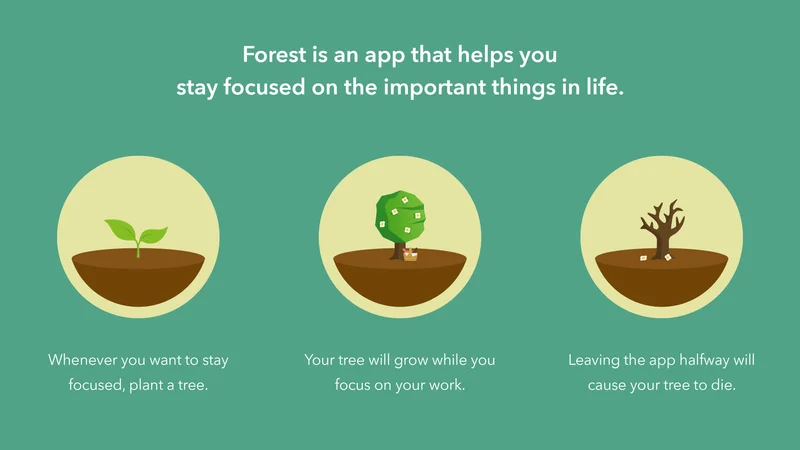
Here’s how it works: You set a timer and “plant” a virtual tree. Stay focused for the full session, and the tree grows. Pick up your phone to scroll or switch apps, and the tree dies. It’s simple, visual, and just gamified enough to keep you off your phone and in your flow.
The concept: Use timed focus sessions with visual reinforcement to help you build better habits and stay off distractions.
The goal: Boost focus, reduce screen time, and stay present—one tree at a time.
|
|
Growing focus (and a few trees)
I started using Forest for writing sprints, admin tasks, and those slippery “just ten minutes on email” blocks that somehow eat half my afternoon.
At first, I kept forgetting to start the timer, and I’d catch myself halfway through a task, annoyed that my nonexistent tree wasn’t growing.
But once I got into the rhythm, the app did what it promised: it helped me stay off my phone and get stuff done.
There’s something surprisingly satisfying about watching a digital forest grow throughout the day. The more sessions you complete, the more trees you plant, and if you stick with it long enough, you can even use earned coins to fund real reforestation projects! Tiny habit, real-world impact 🤯.
I liked using it in Pomodoro-style bursts (25 minutes of focus, 5-minute breaks), especially when I was feeling distracted or stuck. Instead of reaching for my phone during those moments of friction, I found myself pushing through, if only to save the tree.
Was it perfect? Not quite. There were moments when I needed to check Slack or my calendar, and the app penalized me for leaving. But I learned to whitelist certain apps and be more intentional about when I planted a tree, which helped a lot.
And honestly, for Mental Health Awareness Month, Forest feels especially fitting. It nudges you to slow down, focus on one thing at a time, and stop doomscrolling for just long enough to feel a little more in control.
Fewer distractions. More presence. Better focus. That’s a win in my book.
If your brain feels like a browser with 37 tabs open, Forest might be the soft nudge you need to start closing a few.
|
|
Meet your new daily reset
Mindfulness doesn’t have to be complicated. Or time-consuming. Or something you feel guilty about skipping.
The Paperlike 15-Day Mindfulness Method is a flexible, creator-led journal designed to help you slow down, check in, and build a practice that feels like you.
Each day features a different prompt from a different creator, so you’re not just repeating the same routine. You’re exploring, reflecting, and seeing what sticks.
Use the pages that speak to you. Leave the ones that don’t. Duplicate your favorites and come back to them whenever you need a reset.
It’s simple. It’s calming. And it’s made to work with your favorite notetaking app. |
|
Wrap up
That’s it for this month. Take the break. Try the tools. Give yourself a little room to rest and reflect. We’ll be here with more when you’re ready to dive back in.
See you soon.
Lindsay
Productivity & Notetaking Writer
Paperlike |
|
This email was sent to name@example.com because you've subscribed to our newsletter or made a purchase through our site. You can change your content preferences anytime.
No longer want to receive these emails? Unsubscribe. Paperlike GmbH Ballindamm 3 Hamburg, Hamburg 20095 |
|
|
|
|