Hey Paperliker,
It’s summer in the United States, which means peak travel season for many. But no matter where you are in the world, there’s something energizing about switching things up—a change of scenery, a shift in routine, a new rhythm to your day.
This month, we’re leaning into that on-the-go lifestyle with tips for traveling with your devices, working remotely, and staying productive outside the usual setup. Plus, as always, we’ve got the latest notetaking app updates and a new tool in our productivity spotlight.
Let’s hit the road.
|
|
App-ventures in notetaking: What’s new and noteworthy
You’ve got places to be, and your favorite apps are keeping up. From smarter toolbars to math formulas and podcast launches, these updates make notetaking smoother no matter where you’re working from.
Here’s what’s new:
- Goodnotes
- Goodnotes Beta is live — with next-gen handwriting tools and a smarter UI. Check out their YouTube video or read their blog to learn more.
- The sidebar just got a glow-up with easier-to-use buttons.
- Catch up on all updates from April to June 2025 in their full release notes.
- Notability
- Say hello to Scribble Talks, Notability’s podcast.
- The app now tracks your Learn feature usage on a monthly basis (check Settings to see how close you are to your limit).
- Noteshelf
- You can now customize the mini toolbar with all your favorite colors.
- The Shapes tool got a major boost: new shapes, solid fills, gradients, and patterns — all just a tap away.
- MarginNote 4
- Now supports Word, PowerPoint, and Excel files.
- Smoother Notebook/Handwriting Layer UI and mind map syncing.
- Enhanced Markdown-style linking using [[keyword]] to search and create inline cards.
- Evernote
- Not sure what’s changed in Evernote this year? Check out these 110 improvements they made in the first six months of 2025.
- Zoho Notebook
- New Multipane View makes multitasking easier — flip between notebooks and notes without losing your place.
- Penbook
- Apple Pencil users: You can now pin notebooks and browse a redesigned Library and Create tab.
- ZoomNotes
- Added Formula Tool for math and science users (with a handy video walkthrough).
- PDF backups now let you exclude layers you don’t want saved.
|
|
This month: Travel & on-the-go lifestyles
It’s that time of year again — airports are buzzing, backpacks are packed, and remote workers everywhere are figuring out how to balance their workload with a bit of adventure.
- 🧳 How to Stay Productive While Traveling. This article from The City Sidewalks is great for casual travelers and digital nomads alike. It covers everything from essential gear to mindset tips, like staying healthy, managing energy, and making time to explore.
- 🏠 20 Must-Know Tips for Working From Home. Not traveling? No problem. PCMag’s list of work-from-home tips is a solid refresher on creating structure, minimizing distractions, and actually getting things done — even when your commute is just from your bed to your desk.
The takeaway: Wherever you’re working from, a little planning goes a long way. Set boundaries, protect your time, and don’t forget to enjoy the ride.
|
|
Lindsay’s productivity spotlight: Vis OKR
Last year, I dove headfirst into testing out different productivity methods. And honestly? I think I’ve tried them all, or at least all the most popular ones.
This year, I’m shifting gears. Instead of focusing on methods, I’ll explore the tools, apps, and software that can help boost productivity. The best part? I’ll tie them back to the methods we tested last year to show how they can work together.
|
|
About Vis OKR
Back when I tested OKRs (Objectives & Key Results), I loved how they gave me structure and clarity — a way to connect big-picture goals with day-to-day actions. But keeping everything organized in spreadsheets? Not so fun.
This app is built specifically for the OKR method. You can set one or multiple objectives, attach measurable key results to each one, and track progress over time with simple, satisfying visual tools. It even prompts you to check in regularly so you don’t lose momentum.
The concept: Use a structured digital workspace to align your goals with real, trackable outcomes, and actually follow through.
The goal: Take the guesswork out of goal-setting by using a tool that helps you stay focused, motivated, and accountable from start to finish.
|
|
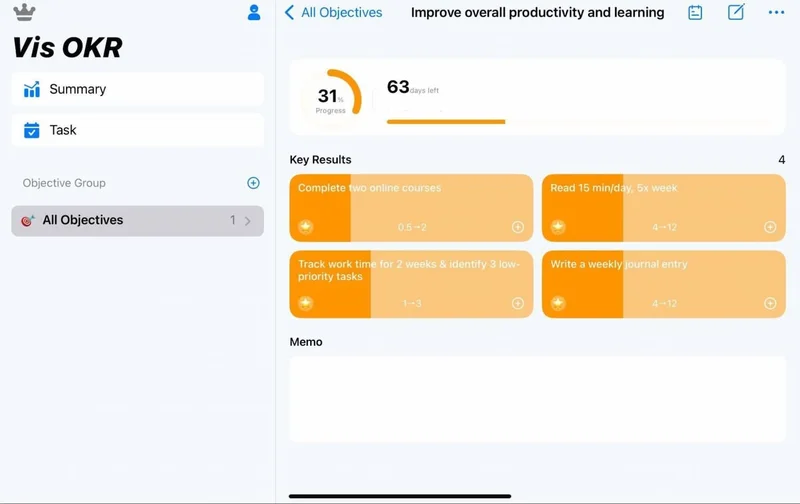
My OKR tracker: one objective, clear key results, and a place to check in regularly. (Vis OKR / Screenshot by Lindsay Armstrong / Paperlike) |
|
Working toward my goals (with Vis OKR by my side)
To really test the app, I recreated one of the OKRs I’d used before:
Objective: Improve my overall productivity and learning.
Key Results:
- Complete two online courses relevant to my work.
- Read 15 minutes a day from a personal development book (5x per week).
- Time-track my work for two weeks and identify three low-priority tasks to delegate or drop.
- Reflect weekly with a short personal summary.
Setting it up in Vis OKR was quick and easy. I added each key result, set deadlines, and chose how I wanted to track progress (e.g., percent complete, frequency). Everything was laid out in a single, clean, and distraction-free view.
The visual progress bars gave me a quick sense of how I was doing each week. And because the app nudged me to check in regularly, I found myself thinking more intentionally about how I was spending my time and how close I was to hitting those key results.
One small win: The weekly summaries helped me course-correct when I got off track. I missed a few reading sessions, but because I was checking in, I was able to bounce back instead of giving up entirely.
Was it perfect? Not quite. I still had to use outside tools (like a habit tracker and a calendar) to manage the day-to-day execution. But overall, Vis OKR gave me a strong foundation and kept me focused on what really mattered.
Using OKRs again reminded me just how effective this method can be. And with Vis OKR in the mix, I wasn’t just setting goals, I was actually making steady progress toward them.
|
|
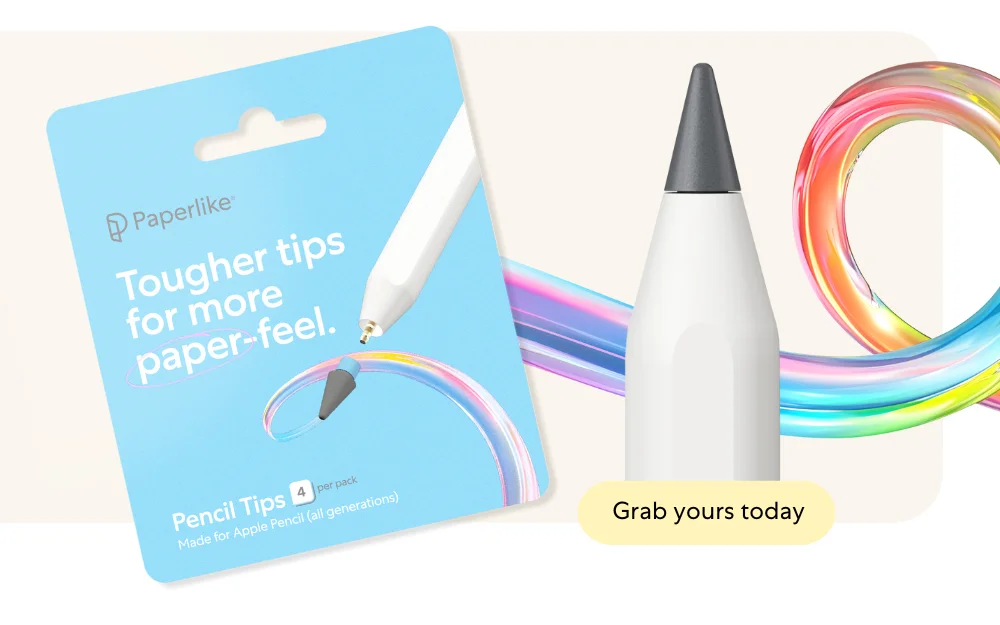
✏️ Paperlike Pencil Tips — now on Amazon!
Love the feel of a pencil on paper? You’re going to love this.
Our Paperlike Pencil Tips are inspired by the smooth, familiar glide of a classic graphite pencil, giving you a slightly coarser paper-feel on Paperlike's Screen Protector.
They're also exceptionally durable, lasting up to 10x longer than the original Apple Pencil Tips!
|
|
That’s a wrap!
Whether you’re traveling the world or just working from a new spot in your own city, we hope this month’s tips, tools, and app updates help you stay focused wherever you are.
Here’s to staying productive (and maybe a little adventurous) along the way.
See you next time!
Lindsay
Productivity & Notetaking Writer
Paperlike |
|
This email was sent to name@example.com because you've subscribed to our newsletter or made a purchase through our site. You can change your content preferences anytime.
No longer want to receive these emails? Unsubscribe. Paperlike GmbH Ballindamm 3 Hamburg, Hamburg 20095 |
|
|
|
|