Hello there, Paperliker!
It's me, Alanna, back for another artist newsletter.
Speaking of newsletters, isn't technology great? It plays a huge role in our daily lives and our work as creatives.
But there's more to the iPad than just our favorite drawing apps. 🎨 So, let's broaden our horizons, shall we?
This month, we'll look into productivity tools and accessories, as well as free brush packs and what's next for the world of social media.
Are you ready to go down this road together? Because once we start, there's no going back!

|
|
This month: All things tech
It's hard to overstate how important technology is for us as creatives. As a digital artist, could you even function without it? (I know I couldn't.)
And why would we when it offers us so many benefits besides the art we create? Like the fact that it has the power to make our lives easier and, as a result, we can be more productive. 😎
As artists, being more productive could mean more inspiration, automating tasks, or adopting a faster workflow. At the center of all of that, we're essentially talking about boosting our creativity. 🚀
So, to help you out, we're going to check out different tools, accessories, and apps that can get you started. Ready to be amazed?
Technology for productivity
Aoiktye Procreate Shortcut Keyboard. You can use this Procreate Shortcut Keyboard to perform up to 20 functions in the program. It connects through Bluetooth, and then it's ready to use. Its light, ergonomic design makes it an ideal companion to speed up your workflow in Procreate (even if you're a pro at the program). Check out this review of the keyboard from artist Rockett Design on YouTube.
Adobe Express + Generative AI. You can use Adobe Express (Adobe's version of Canva) to make graphics and animations and even schedule your social posts. If all of that wasn't impressive enough, their Generative AI integration expands what you can do within the program. From Generative Fill, Text to Template, Generative Images, and more, these tools are streamlining and revolutionizing how we create. Adobe Express is free but also available with premium Adobe subscriptions and plans if you already have one.
AI Productivity Tools. The tools in this list are some of the best for productivity. This allows you to use AI as a companion for your creativity. You can use them to help you with notetaking, summarizing tasks, and even writing emails. Let these tools help you bring order to the chaos of being a creative (or just being you).
Playbook Cloud Storage for Artists. As you create your artwork, the files have to go somewhere. Use Playbook to organize and back up your files with their sleek UI. The best part? Creatives can get 4TB of storage for free! If you're on the fence about how Playbook can help you, check out this article from their blog.
Coolors App for iPad. Do you ever get stuck when you're trying to add color to your work? Use the Coolors app to instantly create color palettes with a simple tap. You can also explore trending palettes from other users in the app. (Yay, community!) You'll also be able to choose from themes to make coloring your artwork fast and easy.
|
|
Image: Adobe Photoshop for iPad
ICYMI: Generative AI makes its way to Adobe Photoshop for iPad
In a world of ever-evolving technology, AI has definitely taken center stage. You may have even seen it featured in different Adobe programs since the announcement at Adobe Max at the end of last year.
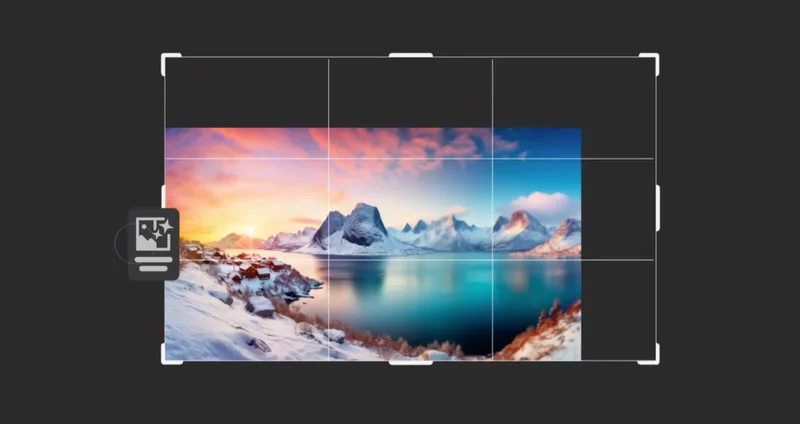
Now, we're finally seeing these desktop features make their way to iPad apps like Adobe Photoshop. They've made so many waves that now you can enjoy those same features on the go. The ones we're seeing in Adobe Photoshop for iPad are called Generative Expand and Generative Fill.
Here are the ways you can use Generative Expand and Generative Fill:
📷 Expand images using the crop tool to make any image fit the exact framing you need with or without using a text prompt.
🖼️ Fill in images to remove parts of your image or add new objects with text prompts.
📐 Straighten images by adjusting an existing image that's off-center and automatically fill in the corners.
Kind of sounds like magic, doesn't it? 🪄
Can you see yourself using these features on your iPad? If you're interested in taking advantage of the power of Adobe Photoshop on the iPad, download it here. |
|
Brushes of the month
An artist is nothing without their tools, and a digital artist's best tools are the brushes they use. When it comes to digital brush packs, there's no such thing as having too many.
That’s why we’re bringing you the latest and greatest from the world of digital brushes.
Whether you’re a Procreate fan or an Adobe loyalist, our round-up has something for everyone.
Let’s take a look at this month’s picks:
|
|
Image: Alejandro Chavetta
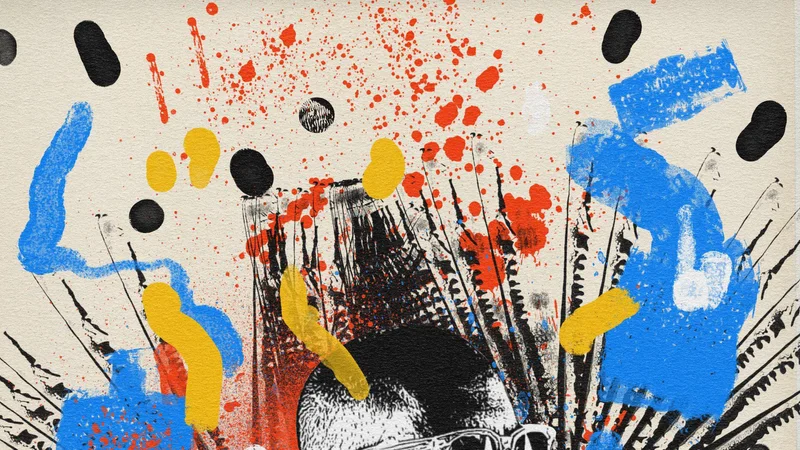
Grunge and Grit Brushes for Photoshop by Alejandro Chavetta
Are you ready to get a little gritty with this massive brush pack? The Grunge and Grit Brushes by Alejandro Chavetta feature 372 brushes that you can add to your Creative Cloud library for free.
Within the brush pack, there are different categories, from textures to ink and more, all inspired by urban street art. To access these free Photoshop brushes, all you need is an Adobe ID.
|
|
Image: Haze Long
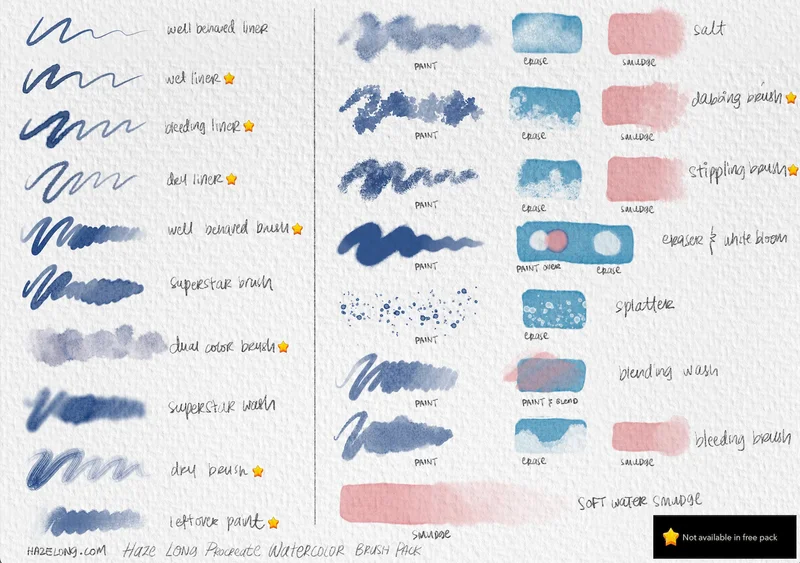
Procreate Watercolor Brush Pack by Haze Long
Get all the fun of watercolor without the mess. The Procreate Watercolor Brush Pack by Haze Long features realistic watercolor brushes that will make you do a double take.
Quick note: The link above takes you to a cart page where you can pay what you want or download the free/demo version.
The free-to-download version of the brush pack comes with 10 brushes and a PDF guide on how to get the most out of the set. You can also get a preview of the brushes in her brush demo.
|
|
Image: Melissa / Gummy
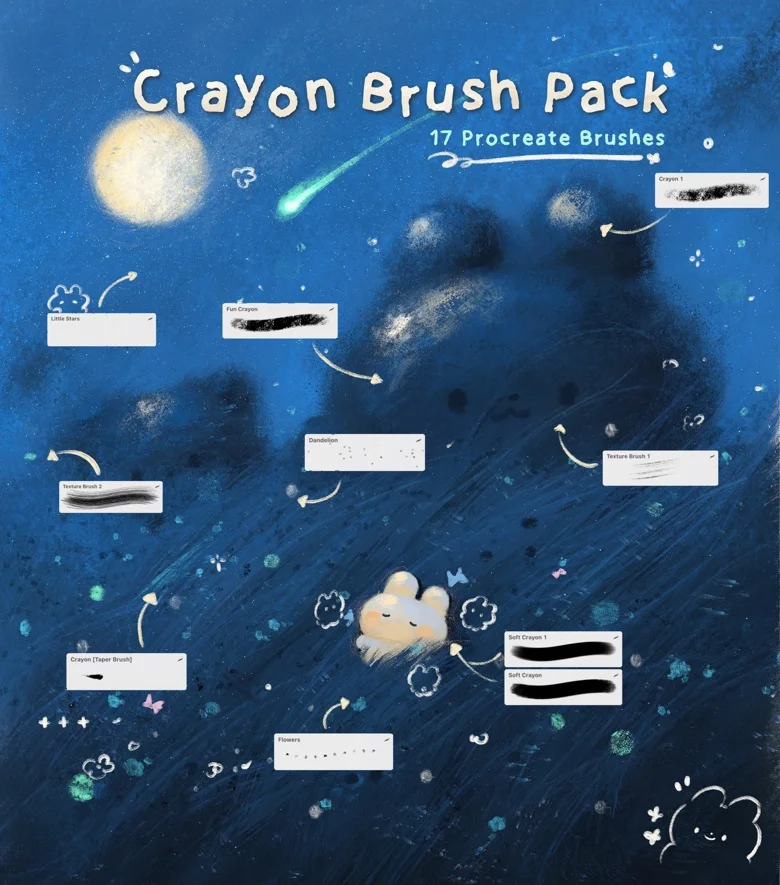
Crayon Brush Pack by Gummy
Tap into your inner child with this fun, free brush pack. The Crayon Brush Pack by Gummy captures the unique textures of crayons along with other fun stamps like stars and flowers.
Featuring 17 brushes for Procreate, you'll also get a sample illustration from the artist so you can see what these amazing brushes can do. Use it for playful textures and realistic effects. |
|
Image: Bluesky
Scroll-stopping takes: Controlling your scroll with Bluesky social
Bluesky is a decentralized social media startup that lets you take control of your own algorithm. That means if you want a feed full of art, cats, and chill vibes, you can make it happen thanks to their custom feeds!
It's all about putting the power of your social media experience (and your data) into your hands and out of theirs. Sounds too good to be true, right?
Well, in a world trending towards chaos for artists on social media, I've recently followed other artists' leads and joined Bluesky myself. Luckily for you, it just opened up to everyone after being invite-only since last year.
Still lost about what this could mean for you?
Bluesky has published this handy blog post featuring a fun comic explaining how they're different from the rest of the social media landscape.
Happy scrolling! |
|
Image Credit: Paperlike
Let's wrap it up
And that's all I've got for you in this month's newsletter. Try your best not to get distracted and instead create something amazing! I know you have it in you.
Oh, and you've got to bring along your favorite accessory: Paperlike.
And if it's not your favorite yet, it will be when you realize how much nicer a bit of resistance and reduced glare feels instead of a slippery glass iPad screen.
Okay, I gotta go. Until the next one!
Alanna
Digital Arts Writer
Paperlike
|
|
This email was sent to name@example.com because you've subscribed to our newsletter or made a purchase through our site. You can change your content preferences anytime.
No longer want to receive these emails? Unsubscribe. Paperlike GmbH Ballindamm 3 Hamburg, Hamburg 20095 |
|
|
|
|